CHIPSET
Intel Chipset Installation Utility for ICH8 for Microsoft Windows 2000 and XP:
There are 2 available driver, one form HP and one from INTEL. I believe both driver work just fine but in case one of it did not work, try another one.
Download (HP driver)
Download (Intel Driver)
GRAPHIC:
Mobile Intel 965 Express Chipset Family Video/Graphics Driver
Download
AUDIO :
UAA drivers (Must be installed before installing the audio driver):
Download
Windows XP SP3: Download (KB835221)
after download , install MS-UAA, restart then download and install the following
Both Conexant Audio and Modem Driver:
Download (mediafire)
If the audio didn't work try this driver:
Install MS_UAA and Restart!
MS-UAA: (if you laready installed MS-UAA above no need to install again, if you do install it again dun worry about that.
Download (sp33867) size 53MB
Then install
Conextant High Definition audio
Download
If the AUDIO still didn't work read instruction at the end of the post.
MODEM:
(if the modem installed along with the audio no need for this driver)
Conexant HDAUDIO Soft Data Fax Modem with SmartCP Driver
Download
WIRELESS:
There are 3 applicable wireless, choose base on your specs, If you do not know which to choose, try which work for you.
Intel(R) PRO/Wireless 3945ABG Network Driver
Download
Broadcom Wireless Driver
Download
Atheros AR5007 802.11b/g Wireless LAN Driver
Download
LAN/ETHERNET:
Realtek RTL8139/810x Family Fast Ethernet NIC Driver
Download
STORAGE:
Intel Matrix Storage Manager
Download
LIGHTSCRIBE
Lighscribe host system Software
Download
WEBCAM
Cyberlink Youcam Driver
Download
TOUCHPAD
ALPS Touchpad Pointing Device Driver
Download
CARD READER
Ricoh 5 in 1 card reader driver
Download
HP Quickplay
Download
1. All the driver tested and worked except intel matrix storage manager, webcam and lightscribe. So these 3 driver i added base on the current official driver listed for vista in Hp website. The driver version for XP choose base on the driver that often work with most HP/Compaq model.
2. This A900 series almost similar with f700 series so that the other if the are one or more driver i suggested here base on the f700 series.
3, The main problem with this model is to get the AUDIO and WIRELESS.
-For audio i give you 3 drivers above. So if not work we must install it manually.
- For the wireless there are 3 applicable wireless, note that the driver for atheros is for vista but reported work with XP. There are the official XP driver for this but you need to install it manually. Try it first and if failed leave a comment and ill will write a post how to manually install the atheros drivers.For those who use the broadcom and Intel, both drivers were tested and worked.
____________________________________________________
MANUALLY INSTALL THE AUDIO and MODEM DRIVERS.
To make this guide friendly to end user. I must compose a post with picture so it easy for you to follow step by step guide. This guide also show to install the modem driver. READ THE GUIDE HERE:
http://getlaptopdriver.blogspot.com/2011/09/compaq-presario-a900-conextant-audio.html
Thứ Năm, 1 tháng 9, 2011

Compaq Presario A975EM Windows XP Driver
CHIPSET
Intel Chipset Installation Utility for ICH8 for Microsoft Windows 2000 and XP:
There are 2 available driver, one form HP and one from INTEL. I believe both driver work just fine but in case one of it did not work, try another one.
Download (HP driver)
Download (Intel Driver)
GRAPHIC:
Mobile Intel 965 Express Chipset Family Video/Graphics Driver
Download
AUDIO :
UAA drivers (Must be installed before installing the audio driver):
Download
Windows XP SP3: Download (KB835221)
after download , install MS-UAA, restart then download and install the following
Both Conexant Audio and Modem Driver:
Download (mediafire)
If the audio didn't work try this driver:
Install MS_UAA and Restart!
MS-UAA: (if you laready installed MS-UAA above no need to install again, if you do install it again dun worry about that.
Download (sp33867) size 53MB
Then install
Conextant High Definition audio
Download
If the AUDIO still didn't work read instruction at the end of the post.
MODEM:
(if the modem installed along with the audio no need for this driver)
Conexant HDAUDIO Soft Data Fax Modem with SmartCP Driver
Download
WIRELESS:
There are 3 applicable wireless, choose base on your specs, If you do not know which to choose, try which work for you.
Intel(R) PRO/Wireless 3945ABG Network Driver
Download
Broadcom Wireless Driver
Download
Atheros AR5007 802.11b/g Wireless LAN Driver
Download
LAN/ETHERNET:
Realtek RTL8139/810x Family Fast Ethernet NIC Driver
Download
STORAGE:
Intel Matrix Storage Manager
Download
LIGHTSCRIBE
Lighscribe host system Software
Download
WEBCAM
Cyberlink Youcam Driver
Download
TOUCHPAD
ALPS Touchpad Pointing Device Driver
Download
CARD READER
Ricoh 5 in 1 card reader driver
Download
HP Quickplay
Download
1. All the driver tested and worked except intel matrix storage manager, webcam and lightscribe. So these 3 driver i added base on the current official driver listed for vista in Hp website. The driver version for XP choose base on the driver that often work with most HP/Compaq model.
2. This A900 series almost similar with f700 series so that the other if the are one or more driver i suggested here base on the f700 series.
3, The main problem with this model is to get the AUDIO and WIRELESS.
-For audio i give you 3 drivers above. So if not work we must install it manually.
- For the wireless there are 3 applicable wireless, note that the driver for atheros is for vista but reported work with XP. There are the official XP driver for this but you need to install it manually. Try it first and if failed leave a comment and ill will write a post how to manually install the atheros drivers.For those who use the broadcom and Intel, both drivers were tested and worked.
____________________________________________________
MANUALLY INSTALL THE AUDIO and MODEM DRIVERS.
To make this guide friendly to end user. I must compose a post with picture so it easy for you to follow step by step guide. This guide also show to install the modem driver. READ THE GUIDE HERE:
http://laptop-driver.blogspot.com/2011/09/compaq-presario-a900-conextant-audio.html
Intel Chipset Installation Utility for ICH8 for Microsoft Windows 2000 and XP:
There are 2 available driver, one form HP and one from INTEL. I believe both driver work just fine but in case one of it did not work, try another one.
Download (HP driver)
Download (Intel Driver)
GRAPHIC:
Mobile Intel 965 Express Chipset Family Video/Graphics Driver
Download
AUDIO :
UAA drivers (Must be installed before installing the audio driver):
Download
Windows XP SP3: Download (KB835221)
after download , install MS-UAA, restart then download and install the following
Both Conexant Audio and Modem Driver:
Download (mediafire)
If the audio didn't work try this driver:
Install MS_UAA and Restart!
MS-UAA: (if you laready installed MS-UAA above no need to install again, if you do install it again dun worry about that.
Download (sp33867) size 53MB
Then install
Conextant High Definition audio
Download
If the AUDIO still didn't work read instruction at the end of the post.
MODEM:
(if the modem installed along with the audio no need for this driver)
Conexant HDAUDIO Soft Data Fax Modem with SmartCP Driver
Download
WIRELESS:
There are 3 applicable wireless, choose base on your specs, If you do not know which to choose, try which work for you.
Intel(R) PRO/Wireless 3945ABG Network Driver
Download
Broadcom Wireless Driver
Download
Atheros AR5007 802.11b/g Wireless LAN Driver
Download
LAN/ETHERNET:
Realtek RTL8139/810x Family Fast Ethernet NIC Driver
Download
STORAGE:
Intel Matrix Storage Manager
Download
LIGHTSCRIBE
Lighscribe host system Software
Download
WEBCAM
Cyberlink Youcam Driver
Download
TOUCHPAD
ALPS Touchpad Pointing Device Driver
Download
CARD READER
Ricoh 5 in 1 card reader driver
Download
HP Quickplay
Download
1. All the driver tested and worked except intel matrix storage manager, webcam and lightscribe. So these 3 driver i added base on the current official driver listed for vista in Hp website. The driver version for XP choose base on the driver that often work with most HP/Compaq model.
2. This A900 series almost similar with f700 series so that the other if the are one or more driver i suggested here base on the f700 series.
3, The main problem with this model is to get the AUDIO and WIRELESS.
-For audio i give you 3 drivers above. So if not work we must install it manually.
- For the wireless there are 3 applicable wireless, note that the driver for atheros is for vista but reported work with XP. There are the official XP driver for this but you need to install it manually. Try it first and if failed leave a comment and ill will write a post how to manually install the atheros drivers.For those who use the broadcom and Intel, both drivers were tested and worked.
____________________________________________________
MANUALLY INSTALL THE AUDIO and MODEM DRIVERS.
To make this guide friendly to end user. I must compose a post with picture so it easy for you to follow step by step guide. This guide also show to install the modem driver. READ THE GUIDE HERE:
http://laptop-driver.blogspot.com/2011/09/compaq-presario-a900-conextant-audio.html
Compaq Presario A975EM Windows XP Driver
CHIPSET
Intel Chipset Installation Utility for ICH8 for Microsoft Windows 2000 and XP:
There are 2 available driver, one form HP and one from INTEL. I believe both driver work just fine but in case one of it did not work, try another one.
Download (HP driver)
Download (Intel Driver)
GRAPHIC:
Mobile Intel 965 Express Chipset Family Video/Graphics Driver
Download
AUDIO :
UAA drivers (Must be installed before installing the audio driver):
Download
Windows XP SP3: Download (KB835221)
after download , install MS-UAA, restart then download and install the following
Both Conexant Audio and Modem Driver:
Download (mediafire)
If the audio didn't work try this driver:
Install MS_UAA and Restart!
MS-UAA: (if you laready installed MS-UAA above no need to install again, if you do install it again dun worry about that.
Download (sp33867) size 53MB
Then install
Conextant High Definition audio
Download
If the AUDIO still didn't work read instruction at the end of the post.
MODEM:
(if the modem installed along with the audio no need for this driver)
Conexant HDAUDIO Soft Data Fax Modem with SmartCP Driver
Download
WIRELESS:
There are 3 applicable wireless, choose base on your specs, If you do not know which to choose, try which work for you.
Intel(R) PRO/Wireless 3945ABG Network Driver
Download
Broadcom Wireless Driver
Download
Atheros AR5007 802.11b/g Wireless LAN Driver
Download
LAN/ETHERNET:
Realtek RTL8139/810x Family Fast Ethernet NIC Driver
Download
STORAGE:
Intel Matrix Storage Manager
Download
LIGHTSCRIBE
Lighscribe host system Software
Download
WEBCAM
Cyberlink Youcam Driver
Download
TOUCHPAD
ALPS Touchpad Pointing Device Driver
Download
CARD READER
Ricoh 5 in 1 card reader driver
Download
HP Quickplay
Download
1. All the driver tested and worked except intel matrix storage manager, webcam and lightscribe. So these 3 driver i added base on the current official driver listed for vista in Hp website. The driver version for XP choose base on the driver that often work with most HP/Compaq model.
2. This A900 series almost similar with f700 series so that the other if the are one or more driver i suggested here base on the f700 series.
3, The main problem with this model is to get the AUDIO and WIRELESS.
-For audio i give you 3 drivers above. So if not work we must install it manually.
- For the wireless there are 3 applicable wireless, note that the driver for atheros is for vista but reported work with XP. There are the official XP driver for this but you need to install it manually. Try it first and if failed leave a comment and ill will write a post how to manually install the atheros drivers.For those who use the broadcom and Intel, both drivers were tested and worked.
____________________________________________________
MANUALLY INSTALL THE AUDIO and MODEM DRIVERS.
To make this guide friendly to end user. I must compose a post with picture so it easy for you to follow step by step guide. This guide also show to install the modem driver. READ THE GUIDE HERE:
http://laptop-driver.blogspot.com/2011/09/compaq-presario-a900-conextant-audio.html
Intel Chipset Installation Utility for ICH8 for Microsoft Windows 2000 and XP:
There are 2 available driver, one form HP and one from INTEL. I believe both driver work just fine but in case one of it did not work, try another one.
Download (HP driver)
Download (Intel Driver)
GRAPHIC:
Mobile Intel 965 Express Chipset Family Video/Graphics Driver
Download
AUDIO :
UAA drivers (Must be installed before installing the audio driver):
Download
Windows XP SP3: Download (KB835221)
after download , install MS-UAA, restart then download and install the following
Both Conexant Audio and Modem Driver:
Download (mediafire)
If the audio didn't work try this driver:
Install MS_UAA and Restart!
MS-UAA: (if you laready installed MS-UAA above no need to install again, if you do install it again dun worry about that.
Download (sp33867) size 53MB
Then install
Conextant High Definition audio
Download
If the AUDIO still didn't work read instruction at the end of the post.
MODEM:
(if the modem installed along with the audio no need for this driver)
Conexant HDAUDIO Soft Data Fax Modem with SmartCP Driver
Download
WIRELESS:
There are 3 applicable wireless, choose base on your specs, If you do not know which to choose, try which work for you.
Intel(R) PRO/Wireless 3945ABG Network Driver
Download
Broadcom Wireless Driver
Download
Atheros AR5007 802.11b/g Wireless LAN Driver
Download
LAN/ETHERNET:
Realtek RTL8139/810x Family Fast Ethernet NIC Driver
Download
STORAGE:
Intel Matrix Storage Manager
Download
LIGHTSCRIBE
Lighscribe host system Software
Download
WEBCAM
Cyberlink Youcam Driver
Download
TOUCHPAD
ALPS Touchpad Pointing Device Driver
Download
CARD READER
Ricoh 5 in 1 card reader driver
Download
HP Quickplay
Download
1. All the driver tested and worked except intel matrix storage manager, webcam and lightscribe. So these 3 driver i added base on the current official driver listed for vista in Hp website. The driver version for XP choose base on the driver that often work with most HP/Compaq model.
2. This A900 series almost similar with f700 series so that the other if the are one or more driver i suggested here base on the f700 series.
3, The main problem with this model is to get the AUDIO and WIRELESS.
-For audio i give you 3 drivers above. So if not work we must install it manually.
- For the wireless there are 3 applicable wireless, note that the driver for atheros is for vista but reported work with XP. There are the official XP driver for this but you need to install it manually. Try it first and if failed leave a comment and ill will write a post how to manually install the atheros drivers.For those who use the broadcom and Intel, both drivers were tested and worked.
____________________________________________________
MANUALLY INSTALL THE AUDIO and MODEM DRIVERS.
To make this guide friendly to end user. I must compose a post with picture so it easy for you to follow step by step guide. This guide also show to install the modem driver. READ THE GUIDE HERE:
http://laptop-driver.blogspot.com/2011/09/compaq-presario-a900-conextant-audio.html
Compaq Presario A900 Conextant Audio Windows XP Drivers (General guide)
So i have to write this post especially for A900 series who have the problem to install audio drivers. So a brief and short intro. This model use Conextant audio drivers, there are many type of conextant audio devices such as conextant smart audio 221, coneextant ac link audio, and conextant venice, so this model tetsed work with conextant venice 5041 driver.
IMPORATNT:
There are overall total of 103 model for A900 model starting with A900 CTO, A900ED .... etc so not all of them use the same conextant driver. Here i will list several driver at the END of this post. So first try with the driver i recommended. If not work repeat the whole installation process using the other driver in the end of the post.
INSTALLING THE DRIVER.
A: INSTALLING MS_UAA
First download and install MS-UAA:
Download (sp33867) size 53MB
The above MS-UAA tested work, but the size to download is big, so you may also use this driver (i didn't test it yet but it also contain the 888111 article for MS-UAA)
UAA drivers (Must be installed before installing the audio driver):
Download
it strongly recomend to use win xp , or win xp sp2, but in case you use sp3;
MS-UAA for Windows XP SP3: Download (KB835221)
Restart after installation.
INSTALLING AUDIO DRIVER:
1. Download this driver:
Download (sp34386.exe)
2. Double click to run the installation, ignore if fail. The reason is to extract the driver file located at c:\SWsetup\SP34386
3. Open device manager by click start and select RUN. Type DEVMGMT.MSC and press enter.
(you can also press Windows button + R at the same time to open the RUN windows)

4. Then click "+" next to, Sound, video and game controllers to expand the list.

5. Right click on Conexant High Definition Audio with YELLOW mark or Audio with yellow mark. Select UPDATE DRIVER.
6. A Driver update windows will open. Select NO to connect and press NEXT.

7. Select 2nd option , ADVANCE - press NEXT.

8. Select Don't search i will choose the driver to install.

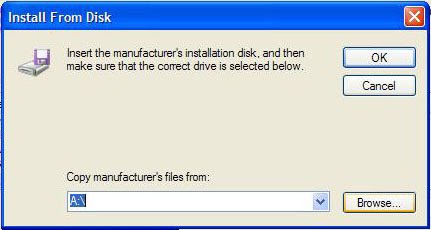
9. select next - HAVE DISK.(uncheck the show compatible hardware button)

10. Select Browse, the point to C:\SWsetup\SP34386 and select the WIS30B5a.inf.

11. Click ok - next and continue with on screen instruction. Ignore if it complaints.
_____________________________________________________
MODEM INSTALLATION:
So for modem download this driver:
Donwload (SP34777)double click to run the installation. ignore if it fail.
repeat the process like the audio driver except for the step 5 and 10.
STEP 5: Right click on MODEM with YELLOW mark . Select UPDATE DRIVER.
STEP 10:Select Browse, the point to C:\SWsetup\SP34777 and select the inf file.
________________________________________________________
IF AUDIO INSTALLATION FAILED.
So as i mention earlier, this model use the following driver:
Conextant Venice High Definition Audio Device (5045)
I failed, you need to repeat the whole audio installation process (no need to install ms-uaa again) try with any of this driver:
Download (SP34200)
Download (SP40762)
report back which work and if still failed. Get me the hardware ID for your model and post in the comments section below. Also remember t add any details, error that you think is important to let me know. For those who try, report which driver work for you and what is your model.
IMPORATNT:
There are overall total of 103 model for A900 model starting with A900 CTO, A900ED .... etc so not all of them use the same conextant driver. Here i will list several driver at the END of this post. So first try with the driver i recommended. If not work repeat the whole installation process using the other driver in the end of the post.
INSTALLING THE DRIVER.
A: INSTALLING MS_UAA
First download and install MS-UAA:
Download (sp33867) size 53MB
The above MS-UAA tested work, but the size to download is big, so you may also use this driver (i didn't test it yet but it also contain the 888111 article for MS-UAA)
UAA drivers (Must be installed before installing the audio driver):
Download
it strongly recomend to use win xp , or win xp sp2, but in case you use sp3;
MS-UAA for Windows XP SP3: Download (KB835221)
Restart after installation.
INSTALLING AUDIO DRIVER:
1. Download this driver:
Download (sp34386.exe)
2. Double click to run the installation, ignore if fail. The reason is to extract the driver file located at c:\SWsetup\SP34386
3. Open device manager by click start and select RUN. Type DEVMGMT.MSC and press enter.
(you can also press Windows button + R at the same time to open the RUN windows)

4. Then click "+" next to, Sound, video and game controllers to expand the list.

5. Right click on Conexant High Definition Audio with YELLOW mark or Audio with yellow mark. Select UPDATE DRIVER.
6. A Driver update windows will open. Select NO to connect and press NEXT.

7. Select 2nd option , ADVANCE - press NEXT.

8. Select Don't search i will choose the driver to install.

9. select next - HAVE DISK.(uncheck the show compatible hardware button)

10. Select Browse, the point to C:\SWsetup\SP34386 and select the WIS30B5a.inf.
11. Click ok - next and continue with on screen instruction. Ignore if it complaints.
_____________________________________________________
MODEM INSTALLATION:
So for modem download this driver:
Donwload (SP34777)double click to run the installation. ignore if it fail.
repeat the process like the audio driver except for the step 5 and 10.
STEP 5: Right click on MODEM with YELLOW mark . Select UPDATE DRIVER.
STEP 10:Select Browse, the point to C:\SWsetup\SP34777 and select the inf file.
________________________________________________________
IF AUDIO INSTALLATION FAILED.
So as i mention earlier, this model use the following driver:
Conextant Venice High Definition Audio Device (5045)
I failed, you need to repeat the whole audio installation process (no need to install ms-uaa again) try with any of this driver:
Download (SP34200)
Download (SP40762)
report back which work and if still failed. Get me the hardware ID for your model and post in the comments section below. Also remember t add any details, error that you think is important to let me know. For those who try, report which driver work for you and what is your model.
Compaq Presario A900 Conextant Audio Windows XP Drivers (General guide)
So i have to write this post especially for A900 series who have the problem to install audio drivers. So a brief and short intro. This model use Conextant audio drivers, there are many type of conextant audio devices such as conextant smart audio 221, coneextant ac link audio, and conextant venice, so this model tetsed work with conextant venice 5041 driver.
IMPORATNT:
There are overall total of 103 model for A900 model starting with A900 CTO, A900ED .... etc so not all of them use the same conextant driver. Here i will list several driver at the END of this post. So first try with the driver i recommended. If not work repeat the whole installation process using the other driver in the end of the post.
INSTALLING THE DRIVER.
A: INSTALLING MS_UAA
First download and install MS-UAA:
Download (sp33867) size 53MB
The above MS-UAA tested work, but the size to download is big, so you may also use this driver (i didn't test it yet but it also contain the 888111 article for MS-UAA)
UAA drivers (Must be installed before installing the audio driver):
Download
it strongly recomend to use win xp , or win xp sp2, but in case you use sp3;
MS-UAA for Windows XP SP3: Download (KB835221)
Restart after installation.
INSTALLING AUDIO DRIVER:
1. Download this driver:
Download (sp34386.exe)
2. Double click to run the installation, ignore if fail. The reason is to extract the driver file located at c:\SWsetup\SP34386
3. Open device manager by click start and select RUN. Type DEVMGMT.MSC and press enter.
(you can also press Windows button + R at the same time to open the RUN windows)
4. Then click "+" next to, Sound, video and game controllers to expand the list.
5. Right click on Conexant High Definition Audio with YELLOW mark or Audio with yellow mark. Select UPDATE DRIVER.
6. A Driver update windows will open. Select NO to connect and press NEXT.
7. Select 2nd option , ADVANCE - press NEXT.
8. Select Don't search i will choose the driver to install.
9. select next - HAVE DISK.(uncheck the show compatible hardware button)
10. Select Browse, the point to C:\SWsetup\SP34386 and select the WIS30B5a.inf.
11. Click ok - next and continue with on screen instruction. Ignore if it complaints.
_____________________________________________________
MODEM INSTALLATION:
So for modem download this driver:
Donwload (SP34777)double click to run the installation. ignore if it fail.
repeat the process like the audio driver except for the step 5 and 10.
STEP 5: Right click on MODEM with YELLOW mark . Select UPDATE DRIVER.
STEP 10:Select Browse, the point to C:\SWsetup\SP34777 and select the inf file.
________________________________________________________
IF AUDIO INSTALLATION FAILED.
So as i mention earlier, this model use the following driver:
Conextant Venice High Definition Audio Device (5045)
I failed, you need to repeat the whole audio installation process (no need to install ms-uaa again) try with any of this driver:
Download (SP34200)
Download (SP40762)
report back which work and if still failed. Get me the hardware ID for your model and post in the comments section below. Also remember t add any details, error that you think is important to let me know. For those who try, report which driver work for you and what is your model.
IMPORATNT:
There are overall total of 103 model for A900 model starting with A900 CTO, A900ED .... etc so not all of them use the same conextant driver. Here i will list several driver at the END of this post. So first try with the driver i recommended. If not work repeat the whole installation process using the other driver in the end of the post.
INSTALLING THE DRIVER.
A: INSTALLING MS_UAA
First download and install MS-UAA:
Download (sp33867) size 53MB
The above MS-UAA tested work, but the size to download is big, so you may also use this driver (i didn't test it yet but it also contain the 888111 article for MS-UAA)
UAA drivers (Must be installed before installing the audio driver):
Download
it strongly recomend to use win xp , or win xp sp2, but in case you use sp3;
MS-UAA for Windows XP SP3: Download (KB835221)
Restart after installation.
INSTALLING AUDIO DRIVER:
1. Download this driver:
Download (sp34386.exe)
2. Double click to run the installation, ignore if fail. The reason is to extract the driver file located at c:\SWsetup\SP34386
3. Open device manager by click start and select RUN. Type DEVMGMT.MSC and press enter.
(you can also press Windows button + R at the same time to open the RUN windows)
4. Then click "+" next to, Sound, video and game controllers to expand the list.
5. Right click on Conexant High Definition Audio with YELLOW mark or Audio with yellow mark. Select UPDATE DRIVER.
6. A Driver update windows will open. Select NO to connect and press NEXT.
7. Select 2nd option , ADVANCE - press NEXT.
8. Select Don't search i will choose the driver to install.
9. select next - HAVE DISK.(uncheck the show compatible hardware button)
10. Select Browse, the point to C:\SWsetup\SP34386 and select the WIS30B5a.inf.
11. Click ok - next and continue with on screen instruction. Ignore if it complaints.
_____________________________________________________
MODEM INSTALLATION:
So for modem download this driver:
Donwload (SP34777)double click to run the installation. ignore if it fail.
repeat the process like the audio driver except for the step 5 and 10.
STEP 5: Right click on MODEM with YELLOW mark . Select UPDATE DRIVER.
STEP 10:Select Browse, the point to C:\SWsetup\SP34777 and select the inf file.
________________________________________________________
IF AUDIO INSTALLATION FAILED.
So as i mention earlier, this model use the following driver:
Conextant Venice High Definition Audio Device (5045)
I failed, you need to repeat the whole audio installation process (no need to install ms-uaa again) try with any of this driver:
Download (SP34200)
Download (SP40762)
report back which work and if still failed. Get me the hardware ID for your model and post in the comments section below. Also remember t add any details, error that you think is important to let me know. For those who try, report which driver work for you and what is your model.
Compaq Presario A900 Conextant Audio Windows XP Drivers (General guide)
So i have to write this post especially for A900 series who have the problem to install audio drivers. So a brief and short intro. This model use Conextant audio drivers, there are many type of conextant audio devices such as conextant smart audio 221, coneextant ac link audio, and conextant venice, so this model tetsed work with conextant venice 5041 driver.
IMPORATNT:
There are overall total of 103 model for A900 model starting with A900 CTO, A900ED .... etc so not all of them use the same conextant driver. Here i will list several driver at the END of this post. So first try with the driver i recommended. If not work repeat the whole installation process using the other driver in the end of the post.
INSTALLING THE DRIVER.
A: INSTALLING MS_UAA
First download and install MS-UAA:
Download (sp33867) size 53MB
The above MS-UAA tested work, but the size to download is big, so you may also use this driver (i didn't test it yet but it also contain the 888111 article for MS-UAA)
UAA drivers (Must be installed before installing the audio driver):
Download
it strongly recomend to use win xp , or win xp sp2, but in case you use sp3;
MS-UAA for Windows XP SP3: Download (KB835221)
Restart after installation.
INSTALLING AUDIO DRIVER:
1. Download this driver:
Download (sp34386.exe)
2. Double click to run the installation, ignore if fail. The reason is to extract the driver file located at c:\SWsetup\SP34386
3. Open device manager by click start and select RUN. Type DEVMGMT.MSC and press enter.
(you can also press Windows button + R at the same time to open the RUN windows)
4. Then click "+" next to, Sound, video and game controllers to expand the list.
5. Right click on Conexant High Definition Audio with YELLOW mark or Audio with yellow mark. Select UPDATE DRIVER.
6. A Driver update windows will open. Select NO to connect and press NEXT.
7. Select 2nd option , ADVANCE - press NEXT.
8. Select Don't search i will choose the driver to install.
9. select next - HAVE DISK.(uncheck the show compatible hardware button)
10. Select Browse, the point to C:\SWsetup\SP34386 and select the WIS30B5a.inf.
11. Click ok - next and continue with on screen instruction. Ignore if it complaints.
_____________________________________________________
MODEM INSTALLATION:
So for modem download this driver:
Donwload (SP34777)double click to run the installation. ignore if it fail.
repeat the process like the audio driver except for the step 5 and 10.
STEP 5: Right click on MODEM with YELLOW mark . Select UPDATE DRIVER.
STEP 10:Select Browse, the point to C:\SWsetup\SP34777 and select the inf file.
________________________________________________________
IF AUDIO INSTALLATION FAILED.
So as i mention earlier, this model use the following driver:
Conextant Venice High Definition Audio Device (5045)
I failed, you need to repeat the whole audio installation process (no need to install ms-uaa again) try with any of this driver:
Download (SP34200)
Download (SP40762)
report back which work and if still failed. Get me the hardware ID for your model and post in the comments section below. Also remember t add any details, error that you think is important to let me know. For those who try, report which driver work for you and what is your model.
IMPORATNT:
There are overall total of 103 model for A900 model starting with A900 CTO, A900ED .... etc so not all of them use the same conextant driver. Here i will list several driver at the END of this post. So first try with the driver i recommended. If not work repeat the whole installation process using the other driver in the end of the post.
INSTALLING THE DRIVER.
A: INSTALLING MS_UAA
First download and install MS-UAA:
Download (sp33867) size 53MB
The above MS-UAA tested work, but the size to download is big, so you may also use this driver (i didn't test it yet but it also contain the 888111 article for MS-UAA)
UAA drivers (Must be installed before installing the audio driver):
Download
it strongly recomend to use win xp , or win xp sp2, but in case you use sp3;
MS-UAA for Windows XP SP3: Download (KB835221)
Restart after installation.
INSTALLING AUDIO DRIVER:
1. Download this driver:
Download (sp34386.exe)
2. Double click to run the installation, ignore if fail. The reason is to extract the driver file located at c:\SWsetup\SP34386
3. Open device manager by click start and select RUN. Type DEVMGMT.MSC and press enter.
(you can also press Windows button + R at the same time to open the RUN windows)
4. Then click "+" next to, Sound, video and game controllers to expand the list.
5. Right click on Conexant High Definition Audio with YELLOW mark or Audio with yellow mark. Select UPDATE DRIVER.
6. A Driver update windows will open. Select NO to connect and press NEXT.
7. Select 2nd option , ADVANCE - press NEXT.
8. Select Don't search i will choose the driver to install.
9. select next - HAVE DISK.(uncheck the show compatible hardware button)
10. Select Browse, the point to C:\SWsetup\SP34386 and select the WIS30B5a.inf.
11. Click ok - next and continue with on screen instruction. Ignore if it complaints.
_____________________________________________________
MODEM INSTALLATION:
So for modem download this driver:
Donwload (SP34777)double click to run the installation. ignore if it fail.
repeat the process like the audio driver except for the step 5 and 10.
STEP 5: Right click on MODEM with YELLOW mark . Select UPDATE DRIVER.
STEP 10:Select Browse, the point to C:\SWsetup\SP34777 and select the inf file.
________________________________________________________
IF AUDIO INSTALLATION FAILED.
So as i mention earlier, this model use the following driver:
Conextant Venice High Definition Audio Device (5045)
I failed, you need to repeat the whole audio installation process (no need to install ms-uaa again) try with any of this driver:
Download (SP34200)
Download (SP40762)
report back which work and if still failed. Get me the hardware ID for your model and post in the comments section below. Also remember t add any details, error that you think is important to let me know. For those who try, report which driver work for you and what is your model.
Dell Inspiron n4050 Windows 7 Drivers (64 bit-x64) Download
 |
| Dell Inspiron n4050 |
Dell Inspiron n4050 Windows 7 Drivers (64 bit-x64) Download
Applications
Dell - QuickSet Application
Dell Inspiron n4050 Windows 7 64bit Driver
(Download)
Audio
IDT - 92HD87B1 Driver
Dell Inspiron n4050 Windows 7 64bit Driver
(Download)
Bios
Dell - Inspiron N4050 System BIOS
Dell Inspiron n4050 Windows 7 64bit Driver
(Download)
Chipset
Realtek - RTS5138 Card Reader Driver
Dell Inspiron n4050 Windows 7 64bit Driver
(Download)
Communication
Conexant - D400,External USB 56K Modem Application
Dell Inspiron n4050 Windows 7 64bit Driver
(Download)
Conexant - D400,External USB 56K Modem Diagnostics Utility
Dell Inspiron n4050 Windows 7 64bit Driver
(Download)
Conexant - D400,External USB 56K Modem Driver
Dell Inspiron n4050 Windows 7 64bit Driver
(Download)
Conexant - D400,External USB 56K Modem Utility
Dell Inspiron n4050 Windows 7 64bit Driver
(Download)
Mouse & Keyboards
Alps - Alps TouchPad Driver
Dell Inspiron n4050 Windows 7 64bit Driver
(Download)
Logitech - Bluetooth Travel Mouse Application
Dell Inspiron n4050 Windows 7 64bit Driver
(Download)
Logitech - Dell Wireless Desktop Keyboard & Mouse bundle Application
Dell Inspiron n4050 Windows 7 64bit Driver
(Download)
Network
Dell - Wireless 1701 802.11 b/g/n Driver
Dell Inspiron n4050 Windows 7 64bit Driver
(Download)
Dell - Wireless 1701 Bluetooth v3.0+HS Driver
Dell Inspiron n4050 Windows 7 64bit Driver
(Download)
Dell - Wireless WLAN 1502 Half Mini-Card Driver
Dell Inspiron n4050 Windows 7 64bit Driver
(Download)
Dell - Wireless 1702 802.11 b/g/n, BT3.0+HS Driver
Dell Inspiron n4050 Windows 7 64bit Driver
(Download)
Realtek - RTL8105E-VB 10/100 Ethernet Controller Driver
Dell Inspiron n4050 Windows 7 64bit Driver
(Download)
SATA Drives
Intel - Rapid Storage Technology Driver
Dell Inspiron n4050 Windows 7 64bit Driver
(Download)
Video
AMD - ATI Mobility Radeon HD 6470 Driver
Dell Inspiron n4050 Windows 7 64bit Driver
(Download)
Dell - Digital TV Receiver DVBT-01 Application
Dell Inspiron n4050 Windows 7 64bit Driver
(Download)
Dell - Digital TV Receiver ATSC-01 Application
Dell Inspiron n4050 Windows 7 64bit Driver
(Download)
Dell - Digital TV Receiver DVBT-01 Driver
Dell Inspiron n4050 Windows 7 64bit Driver
(Download)
Intel - HD Graphics Driver
Dell Inspiron n4050 Windows 7 64bit Driver
(Download)
Đăng ký:
Bài đăng (Atom)
Bài đăng phổ biến
-
 In this moment I want to post about Toshiba Drivers , he is Toshiba Satellite P10 (PSP23E) Drivers . If you need to Toshiba Satellite P10 (P...
 -
 Download Compaq Presario V3754TU Free Drivers For Windows XP Compaq Presario V3754TU Video Drivers Intel X3100 Download (or) Download Compa...
 -
The idea to get the drivers work is normally using the xp drivers and some of the drivers from microsoft update catalog for windows 7.If ...
-
VGA -------------------> Download Web Camera -----------> Download CardRead --------------> Download
-
 Download Samsung NC20 Netbook Drivers for Windows XP Samsung NC20 Bluetooth Driver (Windows XP) Broadcom Bluetooth Driver 5.1.0.6100 (Win XP...
 -
The idea to get the drivers work is normally using the xp drivers and some of the drivers from microsoft update catalog for windows 7.If ...
-
 Toshiba Satellite 5100-503 Drivers For Windows XP download : >> BIOS Update >> Bluetooth Stack >> Chip Set Utility ...
 -
Download Sony VAIO VGN-Z540NBB Drivers for Windows Vista Business 64-bit INDWLL-00193996-1022.EXE Intel® WiFi Link 5100 AGN Driver Update ...
-
Driver - Chipset (4) Compaq Presario CQ32-110TX Chipset Driver Win 7 Intel Chipset Installation Utility and Driver 2010-12-03 , Version:9.1....
-
HP Compaq 6530s Drivers For Windows 7 Enterprise (32 Bit) BIOS contain the HPQFlash Utility and a binary image of the System BIOS (ROM) for ...
